
What is Software? Type of Software.

Software is a set of instructions that tells a device what to do, how to do it, and when to do it. It's the intangible part of a computer that allows users to interact with the device in new ways.
Software is different from hardware, which is the physical components of a computer. Software is essential for managing how a computer operates, and it's used to create applications, scripts, and programs. Some examples of software include:
Operating systems: Allow users to easily access a computer's processing power
Applications: Programs that perform specific tasks, such as word processors, spreadsheets, and database management
Utility software: Programs that run in the background to keep a computer running, such as security and optimization programs
Software can be stored on a computer's hard drive, a USB drive, or hosted over the internet.
The term "software" was first used in 1958 by mathematician John Wilder Tukey.
Introduction to Software
Software is a set of instructions, programs, or applications that tells a computer or electronic device how to perform specific tasks. It enables users to interact with computers and perform complex functions. Software is intangible—it exists in the form of code and data, rather than physical parts. It plays a vital role in modern life, allowing computers to execute diverse tasks from word processing to complex scientific calculations.
What Does Software Stand For?
Software isn’t an acronym and doesn’t stand for anything specific. The term "software" was coined in the 1950s to contrast with "hardware." While hardware refers to the physical components of a computer, "software" suggests something flexible and adaptable, meaning it can be modified or replaced without altering the physical computer.
Need for Software
Software is essential for many reasons:
Automation: Automates repetitive tasks, saving time and reducing human error.
Efficiency: Allows for faster, more efficient data processing and operations.
Productivity: Empowers users to create documents, manage information, and communicate easily.
User Interaction: Provides user interfaces to make computer systems usable and accessible.
Connectivity: Enables networking and communication, making it possible to share data, access the internet, and collaborate.
Types of Software
Software can be categorized into System Software and Application Software. Each category serves distinct purposes in managing and performing tasks on a computer system.
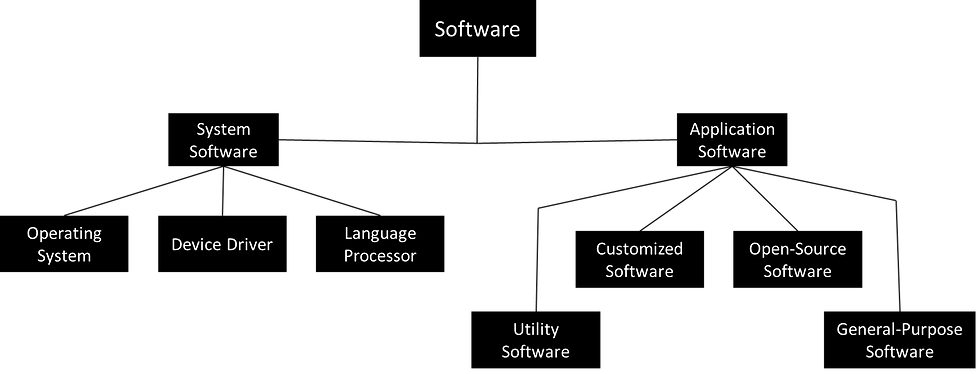
1. System Software
System software is the foundational software that manages and controls computer hardware, enabling other software to function. It acts as an intermediary between the hardware and the user, ensuring that all components operate harmoniously.
Operating System (OS): The core system software that manages hardware resources and provides essential services for application software. The OS controls memory, processing, storage, and provides a user interface. Examples include:
Windows
macOS
Linux
Android
Language Processor: Language processors translate high-level or assembly language code into machine language, which the computer can execute. They are essential for interpreting or compiling programming languages. Types of language processors include:
Compiler: Converts the entire high-level program into machine code before execution (e.g., C, C++ compilers).
Interpreter: Translates high-level language into machine language line-by-line, executing one statement at a time (e.g., Python interpreter).
Assembler: Converts assembly language into machine code.
Device Driver: A device driver is a specialized software that enables the operating system to communicate with specific hardware devices, such as printers, graphics cards, and network adapters. Each device requires a compatible driver to function correctly. Examples include:
Printer Driver: Allows communication with a printer.
Graphics Driver: Manages and optimizes interactions with the graphics card.
Network Driver: Enables internet and network connectivity.
2. Application Software
Application software is designed to help users perform specific tasks or functions. This software works on top of system software, providing users with tools to handle different tasks and solve problems.
General-Purpose Software: Also known as "off-the-shelf" software, general-purpose software is developed for a wide audience to serve common needs and is typically pre-packaged. Examples include:
Word Processors (e.g., Microsoft Word, Google Docs)
Spreadsheets (e.g., Microsoft Excel)
Presentation Software (e.g., PowerPoint, Keynote)
Customized Software: Custom software is developed for a specific organization or set of users to meet their unique requirements. It is often tailored to fit a specific workflow, unlike general-purpose software. Examples include:
Enterprise Resource Planning (ERP) Systems for business management.
Customer Relationship Management (CRM) Systems tailored to manage a company’s interactions with customers.
Inventory Management Systems specifically designed for a particular business.
Utility Software: Utility software performs maintenance and optimization tasks, helping keep the system running smoothly. It generally focuses on system health, security, and performance, assisting the OS in managing resources effectively. Examples include:
Antivirus Software: Scans for and removes malware and viruses.
File Management Tools: Helps manage files and directories (e.g., WinRAR, WinZip).
Disk Cleanup Tools: Removes unnecessary files to free up disk space and improve performance (e.g., CCleaner).
Open-Source Software (OSS)
Open-source software (OSS) is software that makes its source code available for anyone to view, modify, and distribute. Unlike proprietary software, where code is restricted, OSS allows users to freely collaborate, enhance, and customize the software.
Benefits of open-source software include:
Transparency: Users can inspect the code, ensuring there are no hidden functions.
Collaboration: Developers worldwide contribute, leading to rapid innovation.
Cost Savings: Most OSS is free, making it accessible to individuals and organizations.
Flexibility: Users can adapt OSS to their specific needs.
Popular examples of OSS include:
Linux: A widely-used open-source operating system.
Apache: A web server that powers a large portion of the internet.
LibreOffice: An office productivity suite.
GIMP: An image editor for photo manipulation and design.
Integrated Development Environment (IDE)
An Integrated Development Environment (IDE) is a comprehensive tool that helps software developers write, edit, test, and debug code in a more efficient and organized way. An IDE typically combines several tools in one interface, including:
Source Code Editor: Allows developers to write code with features like syntax highlighting and auto-completion.
Compiler/Interpreter: Translates code into machine language or executes it line-by-line for testing.
Debugger: Helps identify errors or bugs in the code and provides ways to fix them.
Build Automation Tools: Streamline repetitive tasks, such as compiling code or running tests.
Some popular IDEs include:
Visual Studio Code: A free, highly customizable IDE popular for multiple programming languages.
Eclipse: Commonly used for Java development but supports other languages through plugins.
IntelliJ IDEA: Known for its powerful features, mainly for Java and Kotlin development.
An IDE enhances productivity, as it provides all necessary tools in one place, making it easier to develop software efficiently.
The system software (like OS, device drivers, language processors, and utilities) creates a functional environment for the application software (general-purpose or customized) to operate, ultimately helping users accomplish their tasks effectively.


Comments