
Converting an ER model into relational Schema

Database Design का पहला चरण (Phase) ER Diagram (Conceptual Design) बनाना होता है। दूसरा चरण इसे Relational Schema (Logical Design) में बदलना होता है, जिसका सीधा मतलब है कि ER डायग्राम को Tables (Rows और Columns) में कैसे कन्वर्ट किया जाए ताकि हम उसे MySQL या Oracle जैसे RDBMS में बना सकें।
इसे बदलने के कुछ निश्चित नियम (Standard Rules) होते हैं। आइए इन्हें एक-एक करके समझते हैं:
Rule 1: Strong Entity को Table में बदलना (Mapping Strong Entities)
नियम: हर Strong Entity के लिए एक नई Table बनाई जाती है।
कॉलम्स (Columns): उस Entity के सभी Simple Attributes उस टेबल के कॉलम्स बन जाते हैं।
Primary Key: Entity का Key Attribute (जिसके नीचे ERD में लाइन खींची होती है) उस टेबल की Primary Key बन जाता है।
Example: यदि ER डायग्राम में Student एक Entity है जिसके Attributes Roll_No (Key), Name, और Age हैं, तो:
Table: Student (Roll_No, Name, Age)
यहाँ Roll_No Primary Key होगी।

Rule 2: Composite Attribute को बदलना (Mapping Composite Attributes)
नियम: Composite Attribute (जो कई छोटे भागों से मिलकर बना हो) के लिए कोई अलग कॉलम नहीं बनाया जाता। इसके बजाय, उसके छोटे भागों (Simple Components) को टेबल के कॉलम्स बनाया जाता है।
Example: यदि Student Entity में Address एक Composite Attribute है जो City, State, और Pincode से मिलकर बना है, तो टेबल में Address नाम का कोई कॉलम नहीं होगा।
Table: Student (Roll_No, Name, City, State, Pincode)

Rule 3: Multi-valued Attribute को बदलना (Mapping Multi-valued Attributes)
नियम: Multi-valued Attribute (जैसे Phone_Number) को उसी मुख्य टेबल में स्टोर नहीं किया जा सकता (क्योंकि RDBMS में एक सेल में केवल एक वैल्यू आ सकती है - 1NF Rule)। इसके लिए एक नई Table (New Table) बनाई जाती है।
कॉलम्स (Columns): इस नई टेबल में दो कॉलम्स होंगे:
वह Multi-valued Attribute खुद (जैसे Phone_Number)।
मुख्य टेबल की Primary Key (Foreign Key के रूप में)।
Primary Key: ये दोनों कॉलम्स मिलकर इस नई टेबल की Composite Primary Key बनाते हैं।
Example: * Main Table: Student (Roll_No, Name)
New Table: Student_Phone (Roll_No, Phone_Number)

Rule 4: Weak Entity को बदलना (Mapping Weak Entities)
नियम: Weak Entity के लिए भी एक अलग टेबल बनाई जाती है।
कॉलम्स (Columns): इस टेबल में Weak Entity के सभी Attributes रखे जाते हैं, साथ ही उस Strong Entity की Primary Key को भी जोड़ा जाता है जिस पर यह निर्भर (Dependent) है।
Primary Key: Strong Entity की Primary Key (जो यहाँ Foreign Key है) और Weak Entity की Partial Key मिलकर इस टेबल की Composite Primary Key बनाते हैं।
Example: यदि Employee (Strong) का Dependent (Weak) है:
Table: Dependent (Emp_ID, Dependent_Name, Relation)

Rule 5: Relationships को Tables में बदलना (Mapping Relationships)
रिलेशनशिप को टेबल में बदलने का तरीका उसकी Cardinality (1:1, 1:N, M:N) पर निर्भर करता है। यह परीक्षा के लिए सबसे महत्वपूर्ण हिस्सा है।
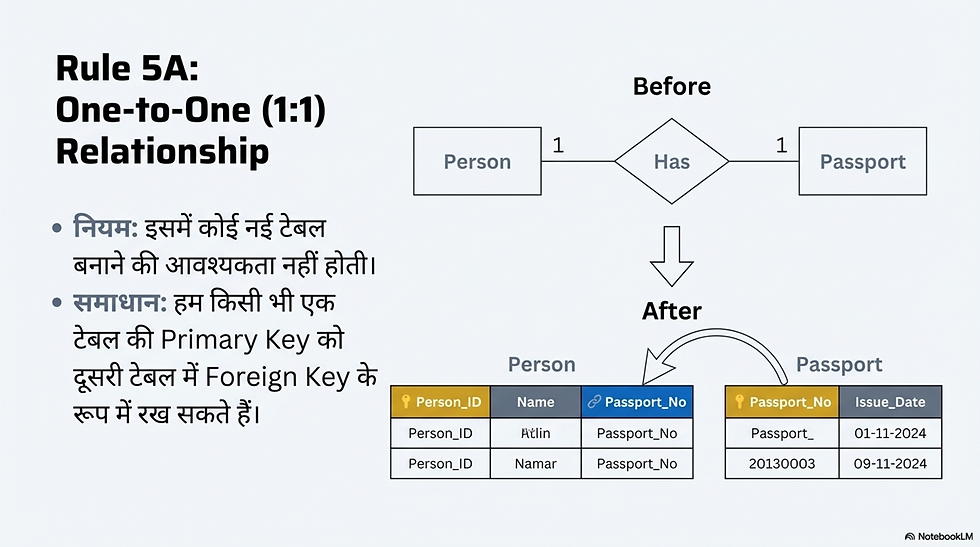
A. One-to-One (1:1) Relationship
नियम: इसमें नई टेबल बनाने की आवश्यकता नहीं होती। हम किसी भी एक टेबल की Primary Key को दूसरी टेबल में Foreign Key के रूप में रख सकते हैं।
Example: Person और Passport (1:1).
हम Passport_No को Person टेबल में एक कॉलम (Foreign Key) के रूप में डाल सकते हैं।
B. One-to-Many (1:N) Relationship
नियम: इसमें भी नई टेबल नहीं बनती है। हमेशा "One" (1) साइड वाली टेबल की Primary Key को "Many" (N) साइड वाली टेबल में Foreign Key के रूप में डाला जाता है।
Example: Department (1) और Employee (N).
चूंकि एक डिपार्टमेंट में कई एम्प्लॉई होते हैं (N साइड Employee है), इसलिए हम Department_ID को Employee टेबल में एक कॉलम बना देंगे।
Department (Dept_ID, Dept_Name)
Employee (Emp_ID, Emp_Name, Dept_ID) (Dept_ID यहाँ Foreign Key है)

C. Many-to-Many (M:N) Relationship
नियम: Many-to-Many Relationship को सीधे दो टेबल्स से नहीं दर्शाया जा सकता। इसके लिए हमेशा एक तीसरी नई Table (Junction Table / Mapping Table) बनानी पड़ती है।
कॉलम्स (Columns): इस नई टेबल में दोनों जुड़ी हुई टेबल्स की Primary Keys को रखा जाता है। अगर रिलेशनशिप का खुद का कोई Attribute है, तो वह भी इसी टेबल में आएगा।
Primary Key: दोनों टेबल्स की Primary Keys (जो यहाँ Foreign Keys हैं) मिलकर इस नई टेबल की Composite Primary Key बनाती हैं।
Example: Student (M) और Course (N).
Student (Roll_No, Name)
Course (Course_ID, Course_Name)
New Junction Table: Enrollment (Roll_No, Course_ID)

Summary Checklist (त्वरित सारांश)
जब भी आप ER Diagram को Tables में बदलें, तो यह चेकलिस्ट याद रखें:
Strong Entity नई Table.
Weak Entity नई Table + Strong Entity की PK.
Multi-valued Attribute नई Table + Main Entity की PK.
1:1 Relationship किसी भी एक Table में Foreign Key डालें।
1:N Relationship 'N' साइड वाली Table में Foreign Key डालें।
M:N Relationship तीसरी नई Table (Junction Table) बनाएं।


Comments