
Control Structures in C Programming

Updated: Nov 4, 2024
Conditions and If Statements
C supports the usual logical conditions from mathematics:
Less than: a < b
Less than or equal to: a <= b
Greater than: a > b
Greater than or equal to: a >= b
Equal to a == b
Not Equal to: a != b
You can use these conditions to perform different actions for different decisions.
C has the following conditional statements:
यदि कोई specified condition true है, तो executed किए जाने वाले code के block को specify करने के लिए if का उपयोग करें
executed किए जाने वाले code के block को specify करने के लिए specify का उपयोग करें, यदि वही स्थिति गलत (false)है
यदि पहली condition गलत है, तो परीक्षण test के लिए एक a new condition specify करने के लिए else if का उपयोग करें
executed किए जाने वाले code के कई वैकल्पिक(alternative) blocks specify करने के लिए switch का उपयोग करें
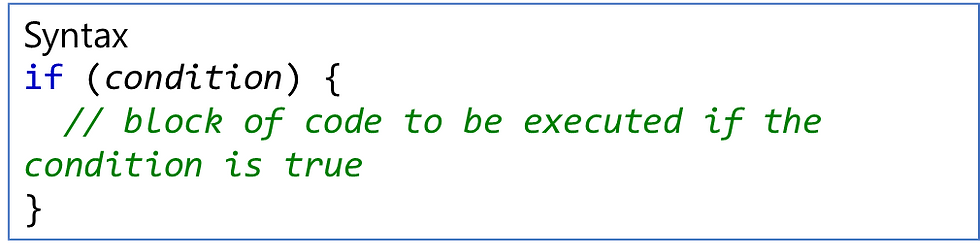
The if Statement
Use the if statement to specify a block of code to be executed if a condition is true.
Flowchart of if

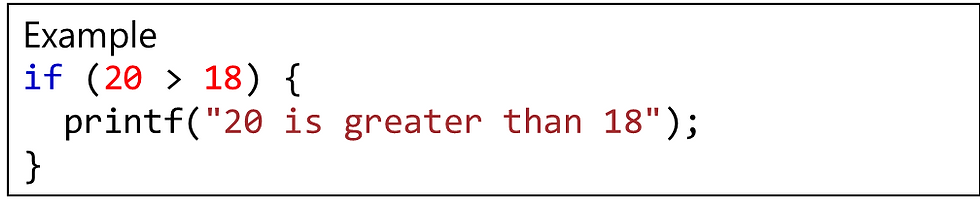
In the example below, we test two values to find out if 20 is greater than 18. If the condition is true, print some text:
The if-else Statement
Use the else statement to specify a block of code to be executed if the condition is false.

Flowchart of if-else


Example explained
In the example above, time (20) is greater than 18, so the condition is false. उपरोक्त उदाहरण में, time (20)<18 है, इसलिए स्थिति गलत है। Because of this, we move on to the else condition and print to the screen "Good evening". इस वजह से, हम else स्थिति पर जाते हैं और screen पर "Good evening“ print करते हैं। If the time was less than 18, the program would print "Good day". यदि time 18 से कम था, तो program “Good day " print करेगा।
The else if Statement
Use the else if statement to specify a new condition if the first condition is false.

Flowchart of if-else-if


Example explained
In the example above, time (22) is greater than 10, so the first condition is false. The next condition, in the else if statement, is also false, so we move on to the else condition since condition1 and condition2 is both false - and print to the screen "Good evening".
However, if the time was 14, our program would print "Good day."
Nested if-else in C
C में nested if एक if statement है जो दूसरे if statement का target है। Nested if statements का अर्थ है एक if statements , दूसरे if statements के अंदर।
हाँ, C और C++ दोनों हमें if कथनों को if कथनों के भीतर nested करने की अनुमति देते हैं, अर्थात, हम एक if कथन को दूसरे if कथन के अंदर रख सकते हैं।

Flowchart of Nested if-else

Example of Nested if-else
#include <stdio.h> int main() { int num; // Ask the user for input printf("Enter an integer: "); scanf("%d", &num); // First level of condition: check if the number is positive, negative, or zero if (num > 0) { printf("%d is positive.\n", num); // Nested if: check if the number is even or odd if (num % 2 == 0) { printf("%d is even.\n", num); } else { printf("%d is odd.\n", num); } } else if (num < 0) { printf("%d is negative.\n", num); } else { printf("The number is zero.\n"); } return 0; }Switch Statement
Instead of writing many if..else statements, you can use the switch statement.
The switch statement selects one of many code blocks to be executed:

This is how it works:-
•switch expression का evaluated एक बार किया जाता है
•expression के value की तुलना (compared) प्रत्येक मामले(each case) के values से की जाती है
•यदि कोई match है, तो code का संबंधित ब्लॉक (associated block) executed किया जाता है
•break statement switch block से बाहर निकल जाता है और execution रोक देता है
• default statement optional है, और यदि कोई case match नहीं खाता है तो चलाने के लिए कुछ code run करता है
The example below uses the weekday number to calculate the weekday name:
Example


Comments